


A detailed SEO audit is a structured review of a website’s technical health, page-level optimization, content quality, and search visibility. It helps identify issues that could affect crawling, indexing, user experience, and organic search performance.
A useful audit combines automated checks with manual review. An audit tool can help surface potential problems, but each finding should be checked in context before making changes.
The goal is not just to generate an audit report, but to turn the findings into a practical SEO action plan.
The challenge is that most website owners don’t realize these issues exist until they see a drop in traffic.
That’s exactly why regular SEO audits are essential in 2026.
But here’s the problem: a modern SEO audit involves checking hundreds of factors across technical SEO, content, user experience, security, and AI search readiness. Doing all of this manually can take hours.
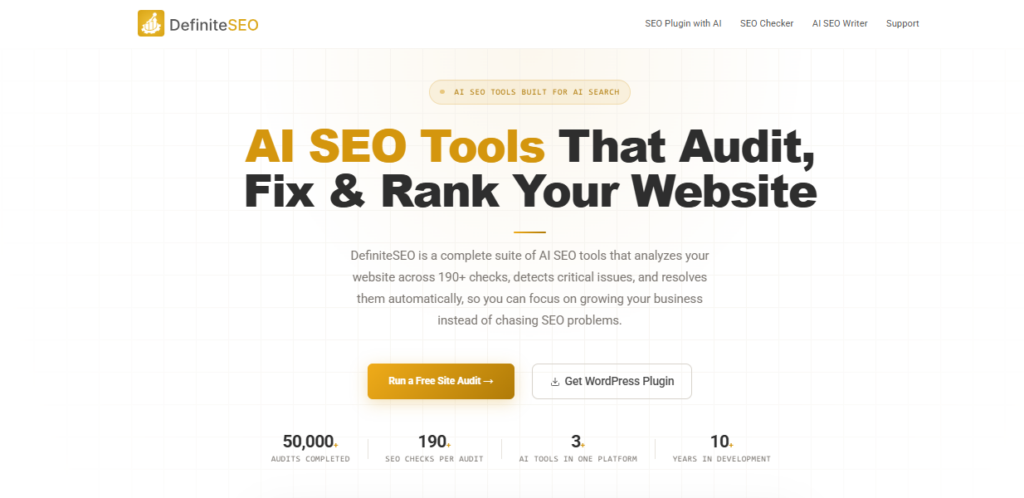
Recently, I started exploring DefiniteSEO, a solution that combines a free website SEO analyzer with a powerful WordPress SEO plugin. It helps website owners, bloggers, marketers, agencies, and businesses identify SEO gaps, fix technical issues, optimize content, and improve visibility across both traditional search engines and AI-powered platforms like ChatGPT, Gemini, Perplexity, and Google AI Overviews.
In this guide, I’ll walk you through the exact process I use to audit a website and show you how DefiniteSEO can simplify the process.
How to Audit a Website Using DefiniteSEO
Step 1: Enter the website you want to audit
Open DefiniteSEO and enter the website URL in the audit interface. Follow the options shown by the tool and start the audit.
Step 2: Review the audit report
Once the report is available, review the issues and recommendations actually displayed. Record the affected URLs and the type of issue before deciding what to fix.
Step 3: Validate important findings
Check a sample of affected pages manually. Confirm that the reported problem exists and understand its likely impact before changing the website.
Step 4: Create an action list
Group the findings into technical SEO, on-page SEO, content, and other categories supported by your audit. Prioritize fixes based on impact, number of affected pages, and implementation effort.
Step 5: Recheck after fixes
After implementing changes, rerun the relevant checks and confirm that the issues have been resolved.
Exclusive Discount for My Readers
Before we dive in, here’s an exclusive offer.

If you’re serious about improving your website’s SEO performance, this discount can help you get started while saving money.
Table of Contents
- What is an SEO Audit?
- Why SEO Audits Matter in 2026?
- Why I Use DefiniteSEO for SEO Audits?
- How I Used DefiniteSEO on My Website?
- Step 1: Run a Complete Website Audit
- Step 2: Check Website Indexing
- Step 3: Analyze Technical SEO
- Step 4: Review Website Speed & Core Web Vitals
- Step 5: Audit On-Page SEO
- Step 6: Review Content Quality
- Step 7: Check Internal Linking
- Step 8: Optimize for AI Search (GEO)
- Manual SEO Audit vs DefiniteSEO
- SEO Audit Checklist
- My Honest Take on DefiniteSEO
- FAQs
What is an SEO Audit?
Think of an SEO audit as a complete health check-up for your website.
It’s not just about keywords anymore.
A proper SEO audit examines everything that affects how search engines discover, crawl, understand, and rank your website.
A comprehensive audit typically covers:
- Technical SEO issues
- Indexing and crawlability
- Website speed and Core Web Vitals
- Content quality and optimization
- User experience
- Internal linking
- Schema markup
- Security issues
- Local SEO
- AI Search Optimization opportunities
Without regular audits, small issues gradually accumulate and eventually impact rankings, traffic, and conversions.
Why SEO Audits Matter More Than Ever in 2026
SEO has evolved dramatically.
Today, visibility isn’t limited to Google Search.
Your content may also appear in:
- Google AI Overviews
- ChatGPT
- Gemini
- Perplexity
- Claude
- Voice Search Assistants
This means websites must be:
- Technically sound
- Fast-loading
- Well-structured
- Authoritative
- AI-friendly
A comprehensive SEO audit helps ensure your website is prepared for both traditional search engines and AI-powered search experiences.
To monitor search impressions, clicks, and indexing issues, first learn how to add your website to Google Search Console
Why I Use DefiniteSEO for SEO Audits
Traditionally, conducting a complete SEO audit requires multiple tools.
You might need:
- A technical SEO tool
- A page speed tool
- A content optimization tool
- A schema validator
- An internal link checker
Managing all these separately can be time-consuming.
DefiniteSEO simplifies the process by analyzing over 190 SEO-related factors in a single audit.
The platform evaluates:
- Technical SEO
- On-Page SEO
- Website Performance
- Core Web Vitals
- Security Issues
- Content Optimization
- Internal Linking
- Domain & Network Signals
- AI Visibility
- Schema Opportunities
What I appreciate most is that it doesn’t simply identify issues – it explains why they matter and helps prioritize what should be fixed first.
How I Used DefiniteSEO on My Own Website
Before recommending any SEO tool, I prefer testing it on a real website.
For this evaluation, I explored DefiniteSEO using my own website, marketechbychandan.com.
The audit immediately highlighted several areas worth reviewing, including:
- Technical SEO recommendations
- Internal linking opportunities
- Performance-related suggestions
- Content optimization insights
- AI search readiness
What stood out was that the platform didn’t simply generate a score.
It provided explanations behind each recommendation, helping me understand both the issue and its potential impact on search visibility.
Step 1: Run a Complete Website Audit
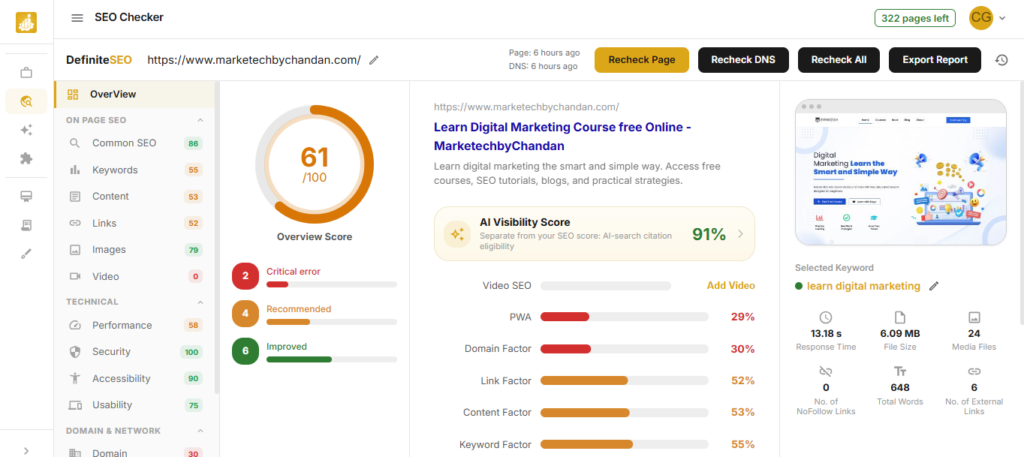
Start by using DefiniteSEO‘s free website analyzer or install the WordPress plugin for deeper integration.
WordPress users gain access to one-click SEO fixes directly inside their dashboard, making it easier to resolve many common optimization issues.
- Critical SEO Issues
- Warnings
- Optimization Opportunities
- Technical Improvements
Step 2: Check Website Indexing
If Google cannot index your pages, they cannot rank.
Start with a simple search:
site:yourdomain.com
Review:
- Indexed pages
- Missing pages
- Duplicate content
- Thin content pages
Common indexing issues include:
- Noindex tags
- Blocked URLs
- Sitemap problems
- Duplicate pages
DefiniteSEO helps identify these issues automatically.
Step 3: Analyze Technical SEO
Technical SEO is the foundation of search visibility.
Review the following:
XML Sitemap
Ensure your sitemap:
- Exists
- Is accessible
- Contains important URLs
Robots.txt
Confirm important pages are not blocked.
Canonical Tags
Prevent duplicate content issues.
Redirects
Check for:
- Redirect chains
- Broken redirects
- 404 pages
HTTPS Security
Verify every page loads securely.
DefiniteSEO automatically scans these technical elements and highlights any issues requiring attention.
Step 4: Review Website Speed and Core Web Vitals
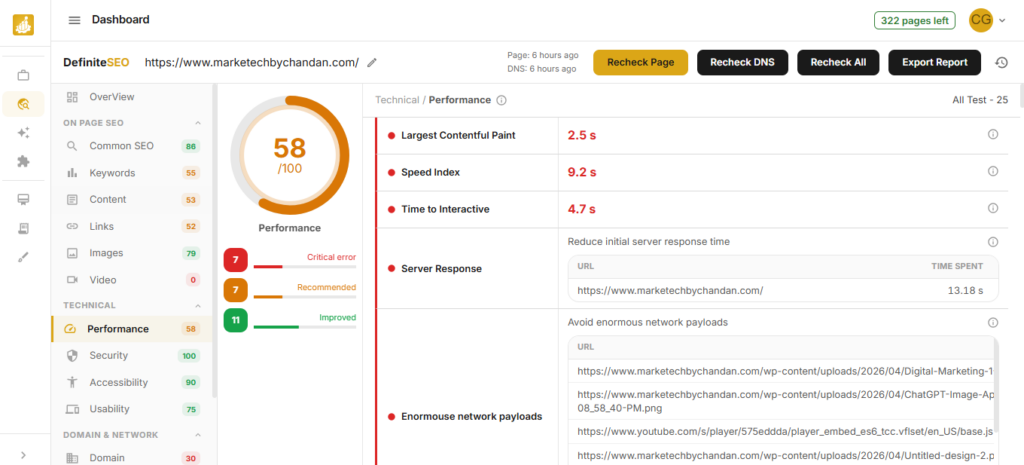
Page speed affects both rankings and user experience.
Key metrics include:
Largest Contentful Paint (LCP): Measures loading performance.
Interaction to Next Paint (INP): Measures responsiveness.
Cumulative Layout Shift (CLS): Measures visual stability.
Common speed issues include:
- Unoptimized images
- Bloated JavaScript
- Large page sizes
- Poor hosting
DefiniteSEO analyzes website performance against Google’s Core Web Vitals benchmarks and highlights factors affecting speed and user experience.
While it isn’t a caching plugin, it clearly identifies optimization opportunities so you know exactly where improvements are needed.
Step 5: Audit On-Page SEO
On-page SEO remains one of the strongest ranking factors.
Review each important page carefully.
Title Tags
Use your primary keyword naturally.
❌ Digital Marketing
✅ Digital Marketing Course for Beginners: Complete Guide 2026
Meta Descriptions
Write descriptions that encourage clicks.
❌ Learn SEO.
✅ Learn how to perform a complete SEO audit and improve your website rankings with this step-by-step guide.
Heading Structure
Maintain proper hierarchy:
- H1
- H2
- H3
- H4
A clear structure improves both readability and SEO.
Image Optimization
Check:
- Alt Text
- File Names
- Image Compression
- Image Dimensions
These are often easy SEO wins.
Step 6: Review Content Quality
Content remains one of the strongest ranking signals.
Ask yourself:
- Does this content satisfy search intent?
- Is it still accurate?
- Is it comprehensive?
- Does it provide unique value?
One thing I’ve consistently observed is that updating older content often delivers faster SEO gains than publishing entirely new articles.
Before creating more content, optimize what you already have.
Step 7: Check Internal Linking
Internal links help search engines understand website structure and distribute authority across your site.
Review:
- Orphan Pages
- Underlinked Pages
- Related Content Opportunities
For example, if you publish an article about Google Search Console, it should naturally link to related SEO and content marketing resources.
DefiniteSEO’s orphan page detection and internal linking recommendations make this process much easier.
Step 8: Optimize for AI Search (GEO)
This is one of the fastest-growing areas of SEO.
Generative Engine Optimization (GEO) focuses on making content discoverable within AI-powered search experiences.
To improve AI visibility:
- Use descriptive headings
- Answer questions directly
- Include FAQ sections
- Add structured data
- Demonstrate expertise and trust
DefiniteSEO includes dedicated AI Search Optimization recommendations designed to improve visibility across AI-powered platforms.
Why AI Search Optimization Matters in 2026
More users are discovering websites through AI-generated answers.
Instead of clicking through search results, users increasingly rely on:
- ChatGPT
- Gemini
- Perplexity
- Google AI Overviews
This means content must be structured in a way AI systems can easily understand, summarize, and reference.
Preparing for AI search today can provide a significant competitive advantage in the future.
Manual SEO Audit vs DefiniteSEO
| SEO Task | Manual Process | Using DefiniteSEO |
|---|---|---|
| Technical SEO Audit | Several hours | Few minutes |
| Internal Link Analysis | Manual review | Automated |
| Orphan Page Detection | Difficult | Automatic |
| AI Search Optimization | Manual research | Built-in recommendations |
| Schema Analysis | Multiple tools | Single dashboard |
| SEO Prioritization | Experience required | Guided recommendations |
SEO Audit Checklist for 2026
Before completing your audit, ensure you’ve reviewed:
- Website Indexing
- XML Sitemap
- Robots.txt
- Canonical Tags
- Redirects
- Core Web Vitals
- Page Speed
- Meta Titles
- Meta Descriptions
- Heading Structure
- Image Optimization
- Internal Linking
- Orphan Pages
- Content Quality
- Schema Markup
- Local SEO
- AI Search Optimization
My Honest Take on DefiniteSEO
I’ve used many SEO tools over the years.
Some specialize in one area. Others try to do everything but become difficult to use.
DefiniteSEO sits somewhere in the middle.
The combination of:
- Website Audits
- Technical SEO Analysis
- Content Optimization
- AI SEO Writing
- AI Search Optimization
- WordPress SEO Management
makes it genuinely useful for day-to-day SEO work.
What stands out most is how it presents information.
Scanning 190+ SEO factors sounds overwhelming, but DefiniteSEO breaks recommendations down into understandable actions with clear priorities.
Another thing I appreciate is that DefiniteSEO focuses on recommendations rather than making automatic content changes. The platform explains issues in plain language and suggests improvements, while keeping complete control in the hands of the website owner.
That balance between automation and human decision-making is something many marketers will appreciate.
Frequently Asked Questions
For most websites, a comprehensive SEO audit every 3 months is recommended. Larger websites may benefit from monthly audits.
There are many SEO audit tools available. DefiniteSEO stands out because it combines website auditing, AI SEO recommendations, content optimization, and AI Search Optimization within a single platform.
An audit itself does not improve rankings. However, fixing the issues identified during the audit can significantly improve search visibility and user experience.
Yes. DefiniteSEO presents findings in simple language and prioritizes issues, making it beginner-friendly while still offering value for experienced marketers.
No. DefiniteSEO identifies issues, explains their impact, and provides recommendations. WordPress users can access certain one-click fixes, but strategic decisions remain under the website owner’s control.
Before investing more time into content creation, advertising, or link building, make sure your website’s foundation is strong.
An SEO audit reveals what’s working, what’s not, and where opportunities exist.
Whether you manage a blog, business website, eCommerce store, or client projects, regular audits help prevent problems from becoming ranking issues.
If you’re looking for a faster, more organized way to perform SEO audits, DefiniteSEO is definitely worth exploring.
Whether you’re a blogger, marketer, agency, or business owner, it’s a great opportunity to strengthen your SEO strategy while saving on your investment.