


Submitting a sitemap in Google Search Console is one of the most important steps for improving your website’s visibility on Google. It helps search engines discover, crawl, and index your pages faster and more efficiently.
In this guide, you’ll learn what a sitemap is, why it matters, and how to submit it correctly in Google Search Console for maximum SEO, AEO, and GEO impact.
Submitting a sitemap tells Google where your sitemap is; it does not guarantee that Google will crawl or index every URL in it.
What is a Sitemap?
A sitemap is a file (usually in XML format) that contains a list of all important pages on your website. It acts like a roadmap for search engines.
It helps Google understand:
- Which pages exist on your website
- When pages were last updated
- Which pages are most important
- How often pages change
Example: https://marketechbychandan.com/post_tag-sitemap.xml
Why Sitemap Submission is Important for SEO
Submitting a sitemap improves:
1. Faster Indexing
Google finds new pages quickly.
2. Better Crawl Efficiency
Search engine bots don’t miss important pages.
3. Improved SEO Performance
Better indexing = better ranking chances.
4. Helps New Websites
New sites get discovered faster.
What is Google Search Console?
Google Search Console is a free tool from Google that helps website owners:
- Monitor search performance
- Fix indexing issues
- Submit sitemaps
- Improve visibility in Google Search
Official tool: Google Search Console
How to Submit Sitemap in Google Search Console (Step-by-Step)
Follow these simple steps:
Step 1: Open Google Search Console
Go to: Google Search Console
Login with your Google account.
Step 2: Select Your Website Property
Choose the website you want to manage.
If your site is not added yet:
- Click “Add Property”
- Verify ownership (DNS / HTML file / tag)
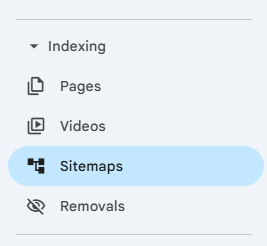
Step 3: Go to “Sitemaps” Section
From the left menu:
👉 Click “Sitemaps”
This section is used to submit and manage sitemap files.
Step 4: Enter Your Sitemap URL
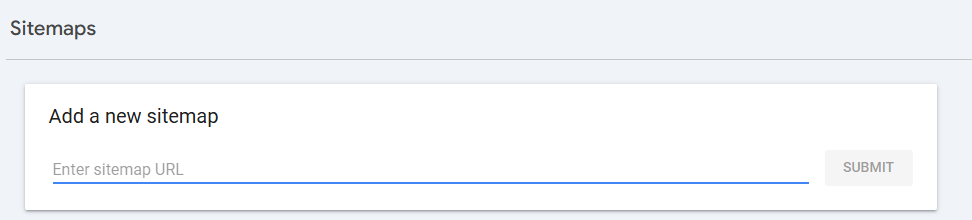
In the “Add a new sitemap” box, enter: sitemap.xml
Step 5: Click Submit
Click the Submit button.
Google will now:
- Crawl your sitemap
- Start indexing pages
- Show status (Success / Errors / Discovered URLs)
Common Sitemap Errors & Fixes
1. Sitemap Couldn’t Fetch
✔ Check URL is correct
✔ Ensure sitemap is publicly accessible
2. Submitted URL Not Indexed
✔ Improve internal linking
✔ Add high-quality content
3. Blocked by robots.txt
✔ Check robots.txt file
✔ Allow important pages
Pro Tips for Better Indexing (2026 SEO Strategy)
- Submit sitemap after every major update
- Keep sitemap clean (remove broken URLs)
- Use separate sitemaps for blog, products, videos
- Combine sitemap with internal linking
- Monitor indexing weekly in Search Console
FAQs
A sitemap is an XML file that contains all important pages of a website. It helps search engines like Google understand your site structure and index pages faster.
Submitting a sitemap helps Google discover your pages quickly, improves indexing speed, and ensures that all important pages are crawled properly.
To submit a sitemap:
Open Google Search Console – Select your website property – Go to “Sitemaps” section – Enter your sitemap URL (example: sitemap.xml) – Click “Submit”
Google can take a few hours to several days depending on your website authority, crawl budget, and content quality.
Yes, indirectly. Sitemap improves indexing, which helps Google discover your pages faster and can improve ranking potential.
Final Summary
Submitting a sitemap in Google Search Console is a must-do SEO step. It ensures:
- Faster indexing
- Better visibility
- Stronger search rankings
- Improved AI search presence (AEO + GEO)
If you consistently maintain your sitemap and content structure, your website performance in Google Search will improve significantly.